
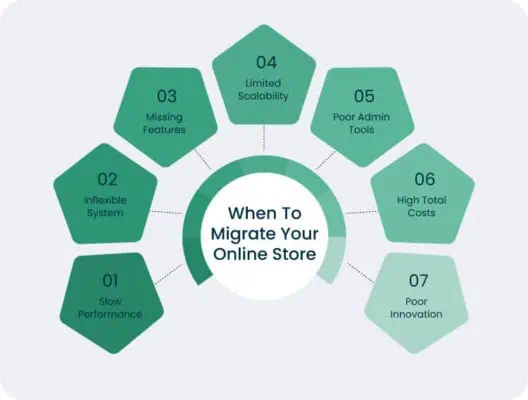
What are the best steps to migrate an online store to Shopify 2025?
Switching platforms for your store can seem daunting, but with the right approach, migrate an online store to Shopify can be a smooth and rewarding experience. This guide provides a step-by-step guide, ensuring you leverage Shopify robust features and enhanced capabilities. From understanding the benefits of moving Shopify to navigating the process of migration, we’ll cover everything you need to know to launch your store successfully.
Understanding Shopify Migration
Shopify migration is the process of moving your existingonline store and all its data—including products, customer data, orders, and content—from your current platform (like WooCommerce or Magento) to Shopify. This process involves several key steps, from planning and preparing your data to setting up your store and importing your information. Many businesses choose Shopify for its user-friendly interface, extensive app ecosystem through App Store, and reliable infrastructure. Whether you’re using Payments of Shopify or another payment gateway, understanding the nuances of migration is crucial for a successful transition.
What is Shopify Migration?
Shopify migration is essentially the process of transferring your entire online business from one platform to Shopify. This includes migrate an online store inventory, transferring customer, and reconfiguring your store setup within the Shopify admin interface. A successful Shopify ensures that none of your critical data is lost and that your new store functions seamlessly. Many choose Shopify to take advantage of offers, such as enhanced security, better scalability, and a more streamlined user experience.
Benefits of Migrating to Shopify
The benefits of Shopify are numerous. In particular, you’ll find that offers several key advantages, including:
- Shopify offers a user-friendly interface that simplifies store management.
- The extensive Shopify Store provides apps like Oberlo and others, allowing you to extend the functionality of your store.
Furthermore, Shopify helps businesses scale, offering solutions like Shopify Plus for larger enterprises. Migrate an online store to Shopify also means benefiting from its robust infrastructure, ensuring high uptime and security. A store also benefits from improved search engine visibility and better mobile optimization.
Challenges in the Migration Process
Despite the numerous benefits, the process to Shopify can present several challenges. Data migration, especially customer data and order history, can be complex and time-consuming. Ensuring data integrity during product import is crucial. Another challenge is selecting the right Shopify plan and payment gateways. Some platforms, like Woo-Commerce to Shopify, might require specific third-party tools or apps to facilitate the move. A well-prepared Shopify checklist can help mitigate these challenges and ensure a smoother transition to your store.
Pre-Migration Checklist
Assessing Your Current Store
Before you even consider beginning the Shopify process, conduct a thorough assessment of your current online store. This involves evaluating your existing infrastructure, including your current platform like WordPress or Magento, the volume of your products Shopify, and the number of customer you need. Analyze your current sales data, customer behavior, and popular product categories to identify what’s working and what isn’t. Understanding your current store’s strengths and weaknesses will inform your migration strategy and help you make informed decisions about setting up your store. This assessment will become a critical part of your Shopify checklist.
Choosing the Right Shopify Plan
Selecting the appropriate Shopify plan is a crucial step in ensuring a smooth migration to Shopify. Shopify offers various plans, each designed to cater to different business sizes and needs. Evaluate your current sales volume, transaction fees, and the features you require, such as advanced reporting or third-party integrations. If you anticipate significant growth, consider a plan that can scale with your business, such as Shopify. Understanding the nuances of each plan will help you make an informed decision that aligns with your business goals and budget. Choosing right Shopify ensures you get the features you need without overpaying, facilitating a cost-effective and efficient switch to Shopify.

Identifying Necessary Apps and Integrations
One of the key benefits of using Shopify is its extensive app ecosystem through Shopify Store. Before you migrate an online store to Shopify, identify the apps and integrations you need to replicate the functionality of your current online store and enhance it. Consider apps for marketing, customer, shipping, and inventory management. Look for apps that offer seamless integration with your existing tools and services, such as email marketing platforms or accounting software. A well-chosen selection of Shopify can significantly improve your store’s efficiency and customer experience. When creating your Shopify checklist, make sure you account for installing and configuring these essential like Oberlo, ensuring a seamless transition to your store.
Step-by-Step Guide to Migrating Your Online Store
Preparing Your Data for Migration
The first step in any successful migration is preparing your data. This involves cleaning, organizing, and backing up your existing data from your current online store. Export your product catalogs, customer records, and order history into CSV files or other compatible formats. For platforms like WooCommerce or Magento, there are plugins that can help facilitate this process. Ensure that all your data is accurate and up-to-date before you import products for Shopify. A well-prepared dataset will significantly streamline the Shopify process. Using these tools for data preparation can also help in ensuring a smooth migration starts to your store.
Migrating Products to Shopify
Migrating products to Shopify is a critical step. Utilize Shopify built-in store importer or third-party apps to upload your product data. Carefully map the fields from your CSV file to the corresponding fields in Shopify to ensure accurate data import. Pay attention to details such as product descriptions, images, SKUs, and pricing. After the import, review a sample of your products in the Shopify admin to verify that everything has been migrated correctly. If you are moving from WooCommerce to migration or from Magento, a Shopify might be needed to ease this process. This ensures your store has all necessary product information.

Migrating Customers and Orders
Migrating customer data and order history is essential for maintaining continuity in your business operations when you move Shopify. Use the same import tools to transfer customer information, including names, addresses, email addresses, and purchase history. When you migrate an online store of customers and orders, ensure that the data is properly associated to maintain accurate records. Depending on your previous platform, you might need a specialized app to handle the complexities of order data. Verifying a few customer accounts post-migration ensures data integrity and that your new one retains all relevant customer information. Further more, looking for a Private Dropshipping Agent, they will help you fulfill orders.
Post-Migration Steps
Verifying Data Integrity
After completing the data process, it’s essential to verify data integrity within your store. This involves checking that all products, customer data, and orders have been migrated accurately and completely. Review a sample of your products and customer records to ensure that the information matches your previous platform. Pay special attention to any data that may have been corrupted or lost during the migration. Thorough data verification is crucial to ensure a seamless transition and maintain the trust of your customers using Shopify.
Setting Up Your Shopify Store
Setting up your store involves customizing the look and feel of your store, configuring shipping settings, and setting up payment gateways like Shopify payments. Choose a theme that aligns with your brand and optimize it for mobile devices. Configure your shipping rates and methods, and integrate your preferred payment to accept payments from customers. Setting up Shopify correctly is essential for creating a professional and user-friendly shopping experience. Choosing the right Shopify is vital in this step. Ensuring a smooth setup is crucial for the success of your online to Shopify.
Launching Your Shopify Store in 2025
Launching your Shopify in 2025 involves a series of final steps to ensure a successful debut. Conduct a thorough testing of your store, including placing test orders, testing payment processing, and verifying shipping calculations. Optimize your store for search engine visibility to attract organic traffic. Announce the launch of your new Shopify to your existing customer base through email and social media channels. A well-executed launch strategy will help you hit the ground running and maximize the success of migrating your online to Shopify.
Shopify Migration Tools and Apps
Overview of Shopify Migration Apps
When considering to migrate an online store, many online owners look to the Shopify’s app for assistance. These Shopify apps are designed to simplify the process of migration, offering features such as automated data, product import, and customer’s data transfer. Using a Shopify app can reduce the manual effort involved in migrating your online, ensuring a smoother transition. These apps like Cart2Cart and LitExtension specialize in migrating from platforms like Woo-Commerce and Magento directly to Shopify, which can save significant time and effort. Migrate an online store easily using Shopify tools to ensure all the data is done and none is missing when you import products.
Using Third-Party Tools for Migration
Third-party tools play a crucial role in the Shopify migration landscape. These tools often provide more advanced features and customization options compared to standard Shopify apps. When you migrate to Shopify, consider using tools that offer comprehensive data migration capabilities, including the ability to handle complex data structures and large volumes of information, ensuring a seamless move Shopify. These third-party service providers can tailor the process of migration to meet your specific needs, whether you are importing from WooCommerce or another platform. If you migrate of customers, these tools can guarantee smooth customer’s data transfer. Using Shopify should be effective and smooth so use the right tools.
Shopify Plus for Large Stores
For large online store operations, this one offers a tailored migration solution. Shopify Plus provides dedicated support and resources to manage complex data migration projects. Migrate an online store to Shopify Plus involves a more strategic and hands-on approach, ensuring minimal disruption to your business operations. With this one, businesses can leverage advanced features and integrations to optimize their new Shopify store. Shopify helps with dedicated account managers and priority support, Shopify Plus ensures a smooth and efficient migration process. With this one you get additional service as well as extra security. For 2025 this can become a standard procedure for a bigger company that wants to switch to Shopify.
Conclusion: Everything You Need to Know About Migrate an online store to Shopify
Final Tips for a Successful Migration
To ensure a successful migrate an online store to Shopify, thorough planning and execution are essential. Create a detailed Shopify migration checklist to guide you through each step of the process. Prioritize data migration and verification to maintain the integrity of your customer’s data and order history. Optimize your new Shopify for search engine visibility. By following this step-by-step guide and best practices, you can confidently move Shopify and take advantage of the platform’s numerous benefits. Whether you’re migrating from WooCommerce a well-executed migration strategy will set your new store up for success. If Shopify doesn’t have a feature you need, check the app store.
Future of Shopify in 2025
Looking ahead to Shopify, the platform is expected to continue evolving with new features and capabilities. Enhanced AI-driven tools will likely streamline the migration process further, making it easier for businesses to migrate to Shopify. Expect more advanced integrations with third party service providers and improved support for emerging technologies. As Shopify make businesses scale, the platform will likely introduce more sophisticated solutions for data migration and store setup. Staying informed about these developments will enable you to leverage the latest advancements and optimize your online to Shopify.
Resources for Ongoing Support
After you launch your Shopify store, ongoing support and resources are crucial for maintaining and growing your business. Shopify offers extensive documentation, tutorials, and community forums to help you navigate the platform. Consider engaging with Shopify experts or joining online communities to learn from other users and stay updated on best practices. The Shopify admin interface provides valuable insights and tools for managing your online store effectively. Ensure you have access to reliable support channels to address any technical issues or questions that may arise. So setting up your shopify support system is essential for all users that decide to move to Shopify.
Private Agent for Dropshipping Success